Help & Guide
Alert Settings
AMT can recognize MT4/MT5 alerts and place entries based on their alert text.
The following describes how to configure automatic entries from MT4/MT5 alerts.
Step 1
Start MT4, configure your indicator, and make sure that it produces alerts.Step 2
Start AMT v2 and open “Alert settings” for any exchange.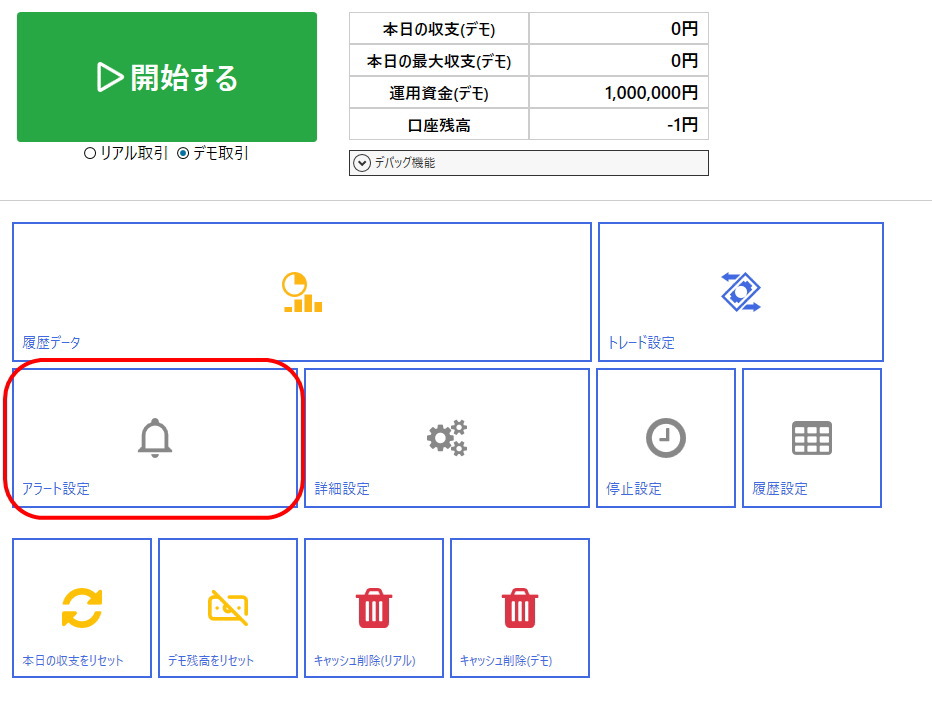
Step 3
Select “+ Add”, then select the blue Edit button for the newly added “Untitled” alert setting.
Step 4
Edit the alert setting to match your indicator (signal tool).For detailed information, hover over each setting item to display its description.
About the “Pattern” search type
“Pattern” lets one alert setting support multiple currency pairs.
In a pattern, each
For example, for “Alert USDJPY Up!!”, the first six consecutive letters are “USDJPY”, allowing an entry for USD/JPY.
In a pattern, each
@ is automatically replaced with the currency-pair letters. If “Currency sign” is @@@@@@, AMT treats the first contiguous six alphabetic characters in the alert text as the currency pair.For example, for “Alert USDJPY Up!!”, the first six consecutive letters are “USDJPY”, allowing an entry for USD/JPY.
| Example: alert setting for “Alert USDJPY Up!!” | |
|---|---|
| Search type | Pattern |
| Condition text | (blank) |
| Currency sign | @@@@@@ |
| High sign | Up |
| Low sign | Down |
If six non-currency letters occur before the currency pair, add identifiable text before or after
@@@@@@. For example, use Symbol:@@@@@@ for “Alert Symbol:USDJPY Signal:Buy”. If your indicator sends a preparation alert and an entry alert, set distinctive text found only in the entry alert (such as entry) as the condition text. Tip
Common High/Low signs include “High/Low”, “Up/Down”, “Buy/Sell”, and “Call/Put”.
Common High/Low signs include “High/Low”, “Up/Down”, “Buy/Sell”, and “Call/Put”.
Step 5
Select “Enabled” in the alert setting, then select “Save” to finish. To quickly verify your configuration, enter an actual alert message in “Test alert text” and select “Test alert”. A correct setting places an entry; otherwise, the System Log explains the cause.
■ Alert setting examples
| Alert text | Search type | Currency sign | High sign | Low sign |
|---|---|---|---|---|
| USDJPY High | Pattern | @@@@@@ | High | Low |
| Signal USDJPY Buy | Pattern | Signal @@@@@@ | Buy | Sell |
| AMTAUTO_USDJPY_Low | Pattern | AMTAUTO_@@@@@@ | _High | _Low |
| Indicator: AUDJPY-cd, M1 << SELL | Pattern | @@@@@@-cd | BUY | SELL |
| Buy signal BTCUSD#, 1 | Pattern | @@@@@@# | Buy | Sell |
If alert settings are unclear or do not work as expected, please contact us through this website’s Contact page.
Signal tools whose alerts do not occur or occur repeatedly
AMT places entries based on MT4/MT5 alert text. It cannot make intended entries from signal tools that only draw arrows, add and remove arrows, or repeatedly generate alerts because of repainting.
For these tools, consider “SYSFAC_AMT_AUTO”, a signal-reading tool provided by FX-EA Labo. Used with AMT, it can read buffer- and object-based arrows and alerts that do not contain a currency pair or entry direction.
For these tools, consider “SYSFAC_AMT_AUTO”, a signal-reading tool provided by FX-EA Labo. Used with AMT, it can read buffer- and object-based arrows and alerts that do not contain a currency pair or entry direction.