Help & Guide
Discord Notifications
By configuring a Discord Webhook, you can send AMT entry results and judgment results to a text channel on your Discord server.
Install Discord on your smartphone to receive AMT notifications immediately and review them wherever you are.
Install Discord on your smartphone to receive AMT notifications immediately and review them wherever you are.
■ Download for mobile
■ How to obtain a Discord Webhook
Note
At present, Webhooks can be obtained only from the Windows and web versions of Discord.They cannot be obtained from the smartphone app.
Step 1
After signing in to Discord, select “Server Settings” for your server, where you want to receive notifications.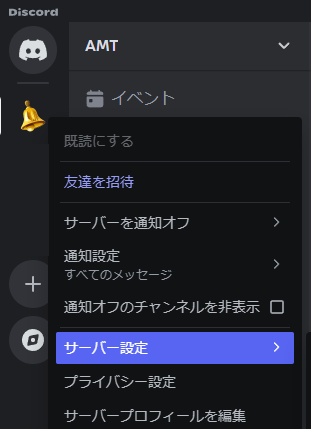
Step 2
Select “Integrations”, then select “Webhooks”.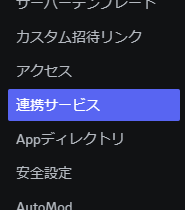
Step 3
Select “New Webhook” and configure the webhook name and the text channel that will receive AMT notifications.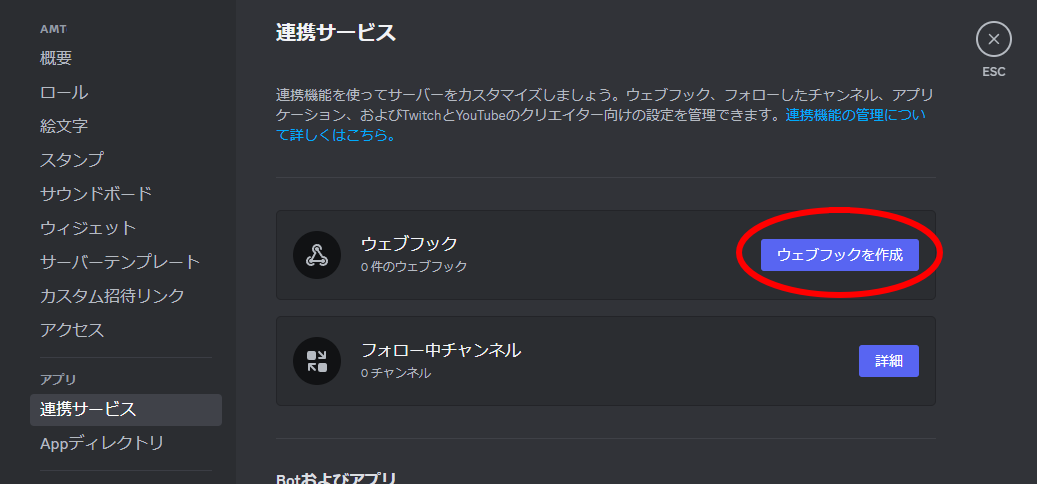
Step 4
Select “Copy Webhook URL”, then paste the copied URL into “Discord notification settings” under “Account settings” in the AMT application and save it.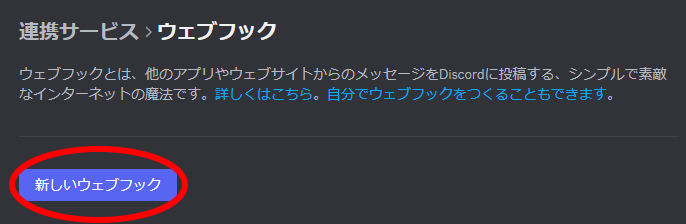
Keep the Webhook URL private.
Anyone who knows this URL can post messages to its configured Discord channel. If you think it has been exposed, delete the Webhook in Discord and create a new one.
Anyone who knows this URL can post messages to its configured Discord channel. If you think it has been exposed, delete the Webhook in Discord and create a new one.