Help & Guide
Understanding failed entries
Entries during settlement
Some options, such as 15-minute trades on certain platforms, reject entries during settlement. This follows the platform's rules and is not an AMT error.
Cause
For example, HighLow 15-minute options may remain in settlement for about 20 seconds after the settlement time. The next 15-minute option is hidden or disabled during this window, including for manual entries.
Example: entry at 19:08:00
- HighLow 5-minute (settlement 19:10) — Entry available
- HighLow 10-minute (settlement 19:15) — Entry available
- HighLow 15-minute (settlement 19:20) — Entry available
Example: entry at 19:09:00
- HighLow 5-minute (settlement 19:10) — Cutoff passed: no entry (hidden or disabled)
- HighLow 10-minute (settlement 19:15) — Entry available
- HighLow 15-minute (settlement 19:20) — Entry available
Example: entry at 19:10:00
- HighLow 5-minute (settlement 19:15) — Entry available
- HighLow 10-minute (settlement 19:20) — Entry available
- HighLow 15-minute (settlement 19:25) — Not yet open (hidden or disabled)
At exactly 19:10:00, settlement is in progress, so the 15-minute option settling at 19:25 has not appeared yet.
19:10:20 (about 20 seconds later)
HighLow 15-minute (settlement 19:25) — Entry available
What to do
Because HighLow 15-minute entries are unavailable during settlement, adjust the signal tool's settings or logic to move the entry timing.
You can also delay entry with AMT's waiting feature. Delaying entry may change the execution rate.
- Open Alert settings (「アラート設定」) in AMT.
- Under Purchase timing (「購入タイミング」), set Waiting time (「待機時間」).
- Enter approximately 20000 milliseconds. 20000 milliseconds equals 20 seconds.
Entries during the cutoff window
Some options close to new entries before settlement, for example one minute before the settlement time.
Cause
For example, HighLow 5-minute options have a cutoff one minute before settlement. An alert during this window cannot enter that option.
Example: one-minute cutoff (HighLow 5-minute)
04:58:30: 1 minute 30 seconds before 05:00 settlement. Entry to the 05:00 option is available.
HighLow 5-minute (settlement 05:00) — Entry available
04:59:01: 59 seconds before 05:00 settlement, after the cutoff. Entry is unavailable.
HighLow 5-minute (settlement 05:00) — Cutoff passed: no entry (hidden or disabled)
What to do
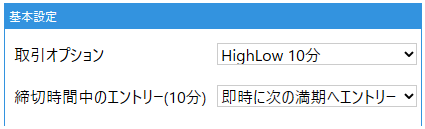
Use AMT's Entry during cutoff (「締切時間中のエントリー」) setting to control how alerts during this window are handled.
For HighLow 10-minute options, set Entry during cutoff (10 minutes) (「締切時間中のエントリー(10分)」) to Immediately enter the next expiry (「即時に次の満期へエントリー」). Alerts during the cutoff then enter the next expiry automatically.
Screenshots show the Japanese interface. Japanese labels in the instructions help you match the controls.
Alerts just before a candle closes
An alert just before a candle closes, such as 03:59:59.950, may appear to target an unexpected settlement time. This follows the time boundary and is correct AMT behavior.
Cause
For a HighLow 10-minute entry, these are the earliest settlement times when the alert arrives at 03:59:59.
- HighLow 5-minute → 04:00:00 settlement (1 second remaining)
- HighLow 10-minute → 04:05:00 settlement (5 minutes 1 second remaining)
Although 04:05:00 looks only five minutes away, it is the expiry after the 5-minute option at 04:00:00, so it is the correct 10-minute target at this moment.
If the alert arrives one second later at 04:00:00, after the candle closes, the next 10-minute expiry settles at 04:10:00.
What to do
The alert timing is very close to candle close. Use the following options to check the clock and adjust the timing.
If you cannot adjust the signal tool, change the timing in AMT.
- Open Purchase settings (「購入設定」) > Purchase timing (「購入タイミング」).
- Enable Wait until next candle (「次足まで待機」), or select a timeframe such as five minutes. An alert at 03:59:59 then waits until 04:00:00 before entry.
- Alternatively, set Waiting time (「待機時間」) to about one second.
If the issue remains or anything is unclear, check the questions and answers, then contact support.